
Main points
- To verify Starlink in Ukraine, users must provide the KIT number or UTID found on the box or in the mobile app.
- Only registered and verified devices will be able to function in Ukraine, and unverified ones will be disconnected from the network.
How to legally use Starlink after the new rules / Starlink
New rules for using Starlink satellite terminals are coming into effect in Ukraine. This involves the introduction of a so-called “white list”, which will include only verified and registered devices. To do this, owners need to go through a simple verification procedure.
The introduction of a ” white list ” for Starlink terminals is associated with security risks. The Ukrainian side has recorded cases of Russia using this commercial technology to control drones and attacks on civilians. In response, a decision was made to restrict the operation of unverified devices. This is reported by the Ministry of Defense of Ukraine .
How to pass Starlink verification in Ukraine?
In the near future , only those Starlink terminals that have passed official registration and verification will operate in Ukraine . All other devices will be disconnected from the network. In addition, for reasons of increased caution, authorized terminals will operate only in stationary mode, and while moving, the speed of network access will be limited.
As the General Staff of the Armed Forces of Ukraine reports on Telegram, for verification, users need to provide one of two identifiers – KIT number or UTID . The Ministry of Defense of Ukraine has published detailed instructions on how to find this data yourself.
The KIT number of the Starlink kit is indicated on the shipping label of the box. This is a white sticker with technical data, where the serial number is indicated in the format KIT00000000 . This code is used to identify the kit during registration.
Starlink verification / Photo Ministry of Defense of Ukraine
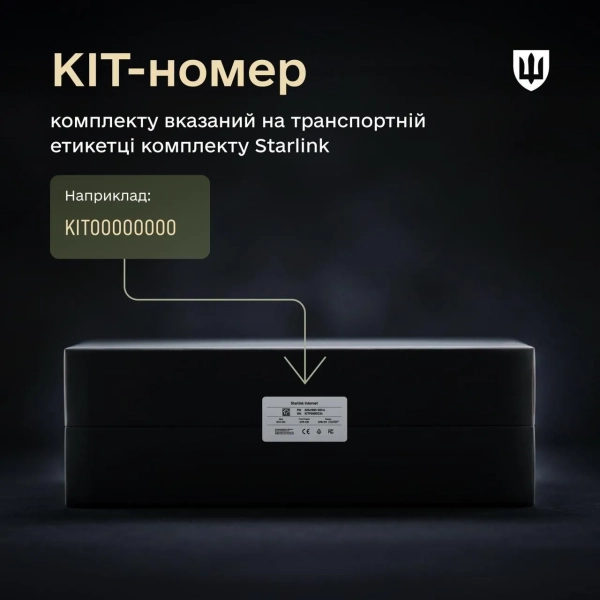
KIT-number / Photo Ministry of Defense of Ukraine
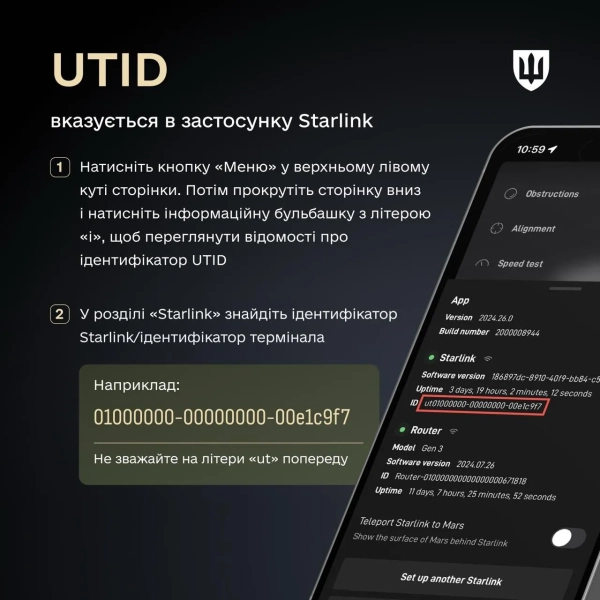
Where to find UTID / Photo Ministry of Defense of Ukraine
You can find the UTID directly in the Starlink mobile app. To do this, you need to connect to the STARLINK Wi-Fi network . If the app has just been installed, you need to select the “Connect to Wi-Fi” item and select the appropriate network.
After that, on the main screen of the application, you should open the menu in the upper left corner, scroll down the page and click on the information icon with the letter “i”. In the “Starlink” section, the terminal identifier or Starlink ID is displayed in a format like 01000000-00000000-00e1c9f7 . The “ut” designation at the beginning can be ignored.
After receiving a KIT number or UTID, this data is used to go through the verification procedure, which allows you to legally use Starlink in Ukraine under the new rules.
How to register your terminal in the ASC?
In Ukraine, a “white list” mode for Starlink satellite terminals is coming into effect , which involves disabling unverified devices that are outside the verified list. The government is introducing this mechanism to strengthen security and control over communication facilities under martial law. How to register your terminal so that the Internet works – read on. To summarize briefly, owners need to go through a fairly extensive equipment verification procedure so that Starlink continues to work without restrictions.
For individuals and private entrepreneurs (FOPs), the verification procedure will start on February 3 through administrative service centers (CSNAP). Before the visit, it is necessary to collect the technical data of the device. These include: KIT number (serial number of the kit), unique antenna identifier (UTID or Dish ID), user account number on the official Starlink portal. You must have a passport (in the form of a booklet or ID card) and identification code (RNOKPP). During the visit, the CSNAP administrator will accept an application for adding the equipment to the “white list”.