
Invisible protection of your conversations: the true purpose of the small dot in the corner of your mobile device / 24 Channel
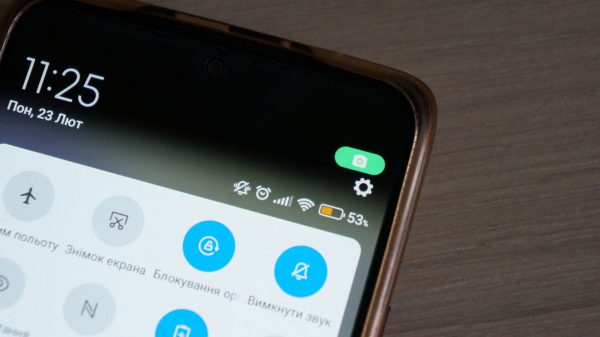
Modern smartphones have become much more complex than their predecessors, as developers are constantly introducing new interface elements, the purpose of which is not always clear at first glance. One such element is a small green dot that suddenly appears at the top of the display. This miniature symbol raises many questions among users, but in fact everything is very simple.
Why is this small interface element critical to gadget security?
Starting with the release of the Android 12 operating system, Google has introduced a special visual notification system that works as a real privacy guard. This indicator, usually located in the upper right corner of the notification panel, signals that one of the applications has currently accessed the device's camera or microphone, writes 24 Channel .
This is a significant step towards transparency in software operations, as previously spyware could use these sensors without the owner being aware of it.
The mechanism of operation of this tool is extremely simple and does not require any additional settings from the user. It is activated automatically as soon as any application – be it a standard photo-taking application or a messenger for video calls – starts using the lens or recording sound.
So, if you're taking a selfie, recording a voice message, or having a video call, it's perfectly normal to see a green dot. However, if the dot is lit up when you're just scrolling through your newsfeed or your phone is sitting on a table without being actively used, it could be a serious cause for concern.
Whether you're using a Samsung, Google Pixel, or OnePlus device, having a modern version of the operating system ensures the same level of control over sensors.
What about iOS?
Similar security measures have been in place in the iOS ecosystem for a long time. Apple notifies its devices of camera or microphone activity using colored indicators in the upper right corner of the screen.
- An orange dot means that an app on your iPhone is using the microphone.
- A green dot indicates that the app is using the camera or camera along with a microphone.
How to find out which program is recording
If you see an indicator, you can quickly identify the source:
- Open Control Center: Swipe down from the top-right corner (or up from the bottom edge on models with a Home button).
- View the report: At the top of Control Center, you'll see the name of the app that recently used or is currently using your camera or microphone.
How effective is such information?
Studies show that the presence of such visual cues makes people more cautious in using apps, and developers more honest about how and when they access the gadget's confidential features.
For those who want more details, the system provides the ability to go deeper. In the device settings, you can find a section called “Privacy Dashboard” or simply “Privacy”. It stores a detailed report for the last twenty-four hours: which applications, when and for how long, accessed the microphone, camera, or location data.
If you find that a regular weather app has suddenly started eavesdropping on your conversations, you can instantly revoke permissions in the application management menu or even completely uninstall the suspicious software.
Are you being spied on?
In situations where the indicator continues to light up for no apparent reason, and checking permissions does not yield results, experts suggest the presence of malicious software or surveillance tools.
In this case, a radical but effective method of solving the problem may be to reset the settings to factory defaults, which will completely clean the system of spyware (you should definitely save important information before doing this).
It will be even better later.
Future versions of Android are expected to make the control system even more sophisticated, offering temporary permissions that are automatically revoked after a certain period of time. This will allow users to feel even more protected in a world where technology is becoming increasingly sophisticated and ubiquitous.