
Main points
- Google introduced vertical tabs in Chrome to improve productivity and organize user space.
- Along with this, the reading mode has been improved.
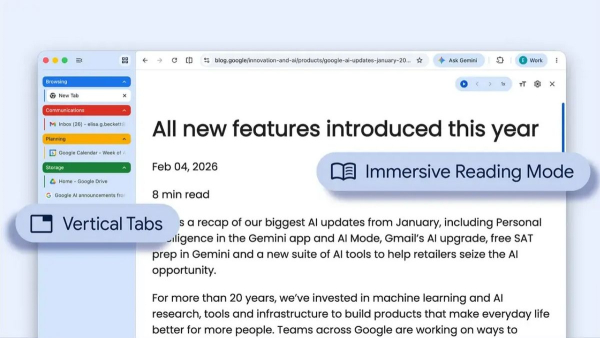
Chrome's new look: how vertical tabs will change the way you work / Google
The popular Chrome browser has received a long-awaited visual update that radically changes the familiar ergonomics of the window. The developers decided to integrate features aimed at increasing productivity and creating a more organized environment for those who are used to working with large amounts of data.
Why did Google decide to change the classic design and how will it affect users?
For years, browser users have watched the traditional horizontal tab bar become cluttered, making navigation much more difficult. In response to this challenge, Google has officially introduced support for vertical tabs, which now appear in a sidebar instead of at the top of the window, writes Mashable.
This approach allows you to see the full names of pages, which is critical for those who have to keep dozens of resources open at the same time, Google itself notes in its blog. Activating the new feature is quite simple: just right-click on any browser window and select the option responsible for vertical display.
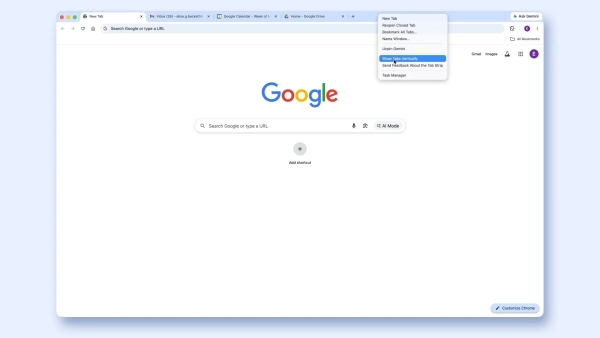
How to enable vertical tabs in Google Chrome / Screenshot 24 Channel/Google
In addition to improving the visibility of headers, the new format makes it much easier to organize groups of tabs. The side-by-side layout creates a cleaner and more structured workspace, helping you switch between different tasks more efficiently.
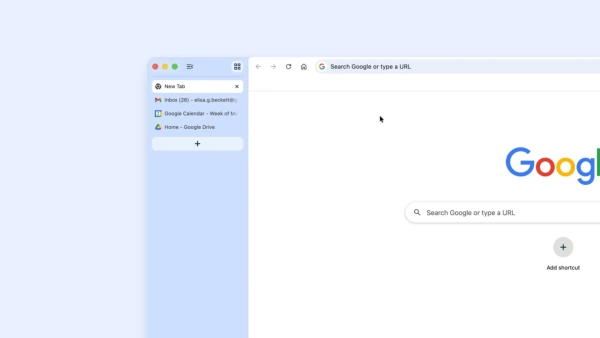
How to enable vertical tabs in Google Chrome / Screenshot 24 Channel/Google
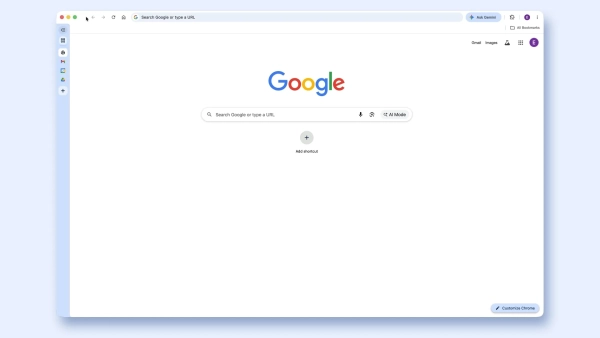
How to enable vertical tabs in Google Chrome / Screenshot 24 Channel/Google
Although similar solutions have long existed in competitors, for example, in Microsoft Edge, the appearance of such a feature in Chrome is a landmark event due to the huge audience of this browser.
Other updates
Along with the navigation update, Google has significantly revised its approach to consuming text content. The company has introduced a full-page interface for reading mode, writes Neowin. Previously, this tool worked only as a sidebar, but now it offers full immersion in the text.
To activate this experience, the user simply right-clicks on a web page and selects the appropriate menu item. This instantly removes all unnecessary elements, including ads and distracting visual noise. The result is a clean, text-only environment that promotes deep reading and better concentration.
These changes demonstrate Chrome's commitment to a flexible and responsive interface. Users are given more control over how they structure information and minimize distractions. The combination of vertical tabs and an improved reading mode underscores Google's commitment to making browsing as efficient as possible.
In an environment of increasing competition between browsers, features like these help Chrome remain a relevant tool for modern workflows.
New features began appearing in the desktop version of the browser on Tuesday, April 7, 2026, and will soon become available to all categories of users.