
Main points
- Privacy Display on the Galaxy S26 Ultra darkens the screen when viewed at an angle to protect data from prying eyes.
- The function allows you to adjust the protection level, has two modes, and is activated via the quick settings panel.
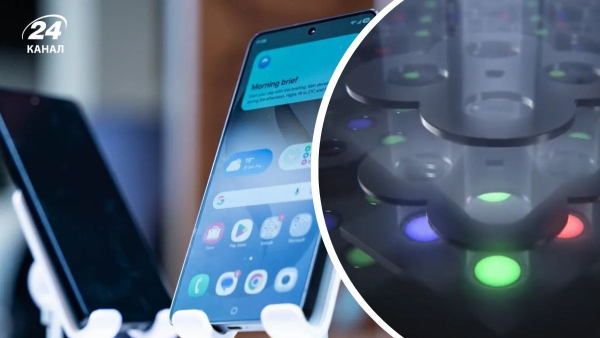
I Galaxy S26 Ultra hides the screen from outsiders / Collage 24 Channel / Photo Samsung / 9to5google
Samsung has made a bet on security in the Galaxy S26 Ultra. The flagship received a hardware Privacy Display function that darkens the screen when viewed at an angle. It helps hide notifications, chats, documents and other sensitive data from prying eyes in public places. Here's how it really works.
After the announcement of the new flagship Samsung Galaxy S26 Ultra, social networks began to heatedly discuss the new security feature of the flagship – Privacy Display. The function is truly surprising and causes a “wow effect”, which has not been the case during smartphone announcements for a long time. 24 Channel has figured out how exactly Privacy Display works and we will explain what makes it innovative.
How does Privacy Display work on the Galaxy S26 Ultra?
Samsung has introduced Privacy Display as an exclusive feature for the Samsung Galaxy S26 Ultra. And we're not talking about a software filter or film, but a completely hardware solution built directly into the display at the pixel level.
The technology was developed by Samsung Display . To briefly describe the working principle of Privacy Display, the feature uses narrow pixels and special light scattering control.
In practice, this is what it looks like: if you look at the screen straight on, the image remains completely clear. But at an angle, the display darkens dramatically – so much so that it looks almost off to an outside observer.
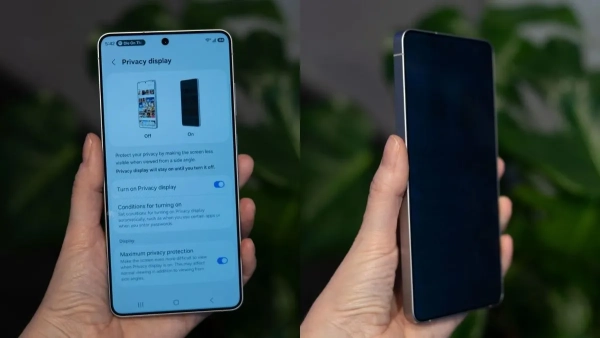
At an angle, nothing is visible on the screen at all / Collage by Channel 24 / Photo by The Verge
Unlike anti-spyware protective glass, Privacy Display can be instantly turned on or off via the quick settings panel. In addition, this feature can be finely tuned and customized – in the settings, you can activate it with a password, pattern or PIN, as well as automatically turn it on when working with specific applications, such as corporate email.
In addition, the function has two modes:
- Maximum Privacy Protection – completely hides the screen when viewed from an angle above, below, or from the side. It looks like the photo above – the screen is practically dark and it is impossible to see any information.
- Partial Screen Privacy – darkens only the notification shade. In this scenario, the user can see the message, but outsiders cannot read the text in the window.
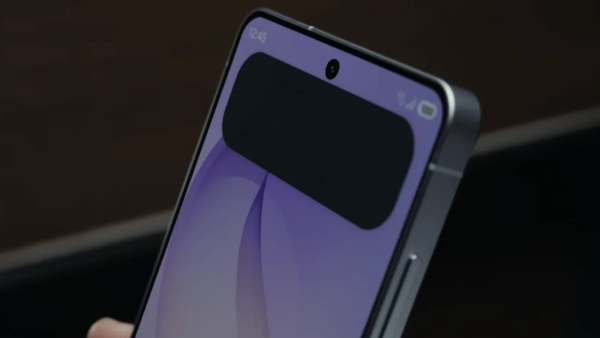
This is what Partial Screen Privacy looks like / Screenshot from Channel 24 from Samsung video
During the demonstration at the Galaxy Unpacked 2026 presentation, the screen did indeed become unreadable from the side. However, during direct use, there was no noticeable difference in the display – the experience remained familiar.
How is this implemented “under the hood”?
Back in 2024, Samsung Display introduced a technology called Flex Magic Pixel . It became the basis for the Privacy Display, which was later refined and adapted for a production smartphone.
The solution is based on the characteristics of AMOLED panels. Such screens with an active matrix of organic light emitting diodes (Active-Matrix Organic Light Emitting Diode) have backlighting at the level of each individual pixel, which allows for very precise control of the light they emit, explains T3.
The Privacy Display uses a more complex scheme: a combination of wide and narrow light elements arranged in a staggered pattern. The system can determine which type of backlight is active – one or both – and thus adjust the visibility of the image at sharp angles.
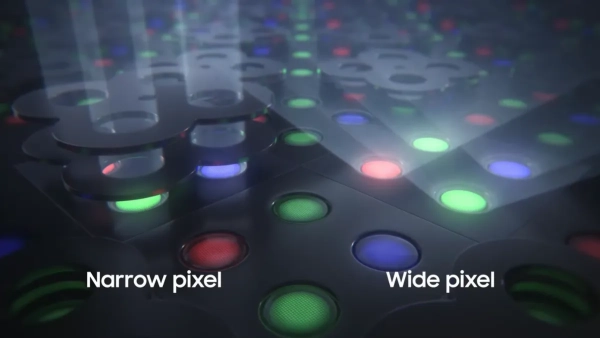
Direct lighting and wide pixel lighting / Photo by Samsung
A little more technical explanation
Before privacy mode is activated, all layers of the display have the same refractive index. Light passes through them without obstruction, so the image is clearly visible even at an angle.
When Privacy Mode is enabled, voltage is applied to the liquid crystal layer, and its optical properties instantly change. This “reveals” a microscopic diffraction structure – a kind of grating that works like tiny blinds and directs light directly at the person holding the smartphone in their hand.
Rays that try to exit at a wide angle to the left or right are deflected as they pass through this structure. In other words, their direction is forced to bend before the light even leaves the screen.
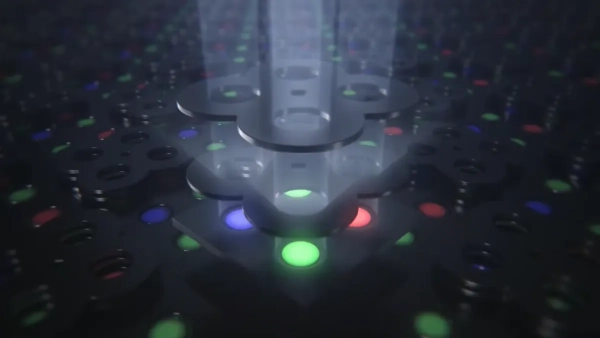
The rays are directed directly at the viewer / Photo Samsung
After that, the light hits the upper optical structure – a microprism or microlens system.
- What the smartphone owner sees. Rays traveling straight ahead pass unhindered through the optical system. Moreover, their exit angle is additionally “compressed”. Due to this, the image remains clear and bright when viewed directly, but the effective viewing angle becomes very narrow.
- What the observer sees. Rays directed at a large angle encounter prismatic slopes in an unfavorable geometry. Due to the difference in refractive indices between the layers, they cannot pass outward. Some of the light is distorted, some is completely reflected back into the display. As a result, to a person from the side, the screen appears dark or almost black.
As a result, when viewed from the side, the light is not scattered enough, so the screen looks dark – almost as if a physical protective film with a privacy effect has been glued to it.
How Privacy Display works – watch the video:
Samsung has not yet specified whether Privacy Display will appear in other models. It is currently only available in the Ultra version. At the same time, all smartphones in the S26 series have received additional security tools.
Other security features of the Galaxy S26 line
Most of the new security features in Samsung smartphones are based on the Knox security system. In particular, Knox Vault stores personal data and biometric information in isolation – similar to the Google Titan M2 security coprocessor in Google devices.
The devices also received other privacy features:
- Call Screening – analyzes incoming calls and helps determine who is calling.
- Privacy Alerts – notifies you if apps are trying to access data without permission.
- Private Album – a separate gallery with a lock for photos and images.
New AI features also work with additional security. The Personal Data Engine encrypts personal information and stores it in the Knox Vault. This is how tools like Now Nudge work, where on-device AI analyzes conversations to suggest actions, but the data remains secure.
Samsung is positioning the Galaxy S26 as a line with a strong focus on privacy – both for protecting the screen in public places and for controlling personal information when working with AI.