
Main points
- Adobe has introduced Acrobat Spaces, a free AI-powered tool aimed at students to compete with Google NotebookLM.
- The service allows you to upload various document formats, generate interactive training materials, and has a built-in AI assistant to explain complex concepts.
Adobe Acrobat Spaces / Adobe
Adobe, which has long focused primarily on the professional segment, has officially introduced Acrobat Spaces, a free AI-powered tool designed specifically for the student community. The initiative is a direct step towards competing with services such as Google NotebookLM, Goodnotes, and Turbo AI.
The main goal of the developers was to create a universal hub where young people could not only read documents, but also instantly turn them into effective educational materials. But there is one problem: the service is too similar to its closest competitor, not offering, at first glance, anything fundamentally new, writes TechCrunch.
What are the possibilities with Acrobat Spaces?
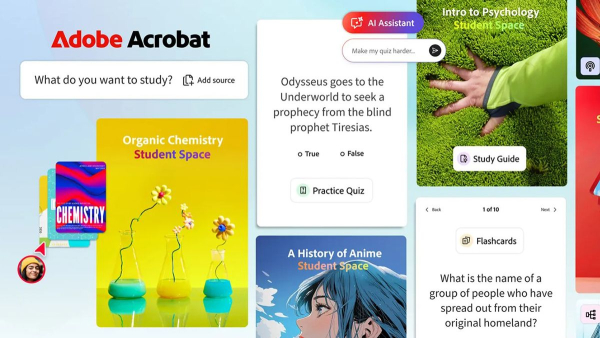
The new platform's functionality allows you to upload a wide range of formats, including PDFs, text documents, PowerPoint presentations, Excel spreadsheets, website links, handwritten notes, and transcription files.
Based on this input, the system is able to generate not only simple text answers, but also interactive flashcards, mind maps, quizzes and full-fledged presentations, which are edited through integration with Adobe Express. In addition, users can create detailed training manuals and plans to structure the training course.
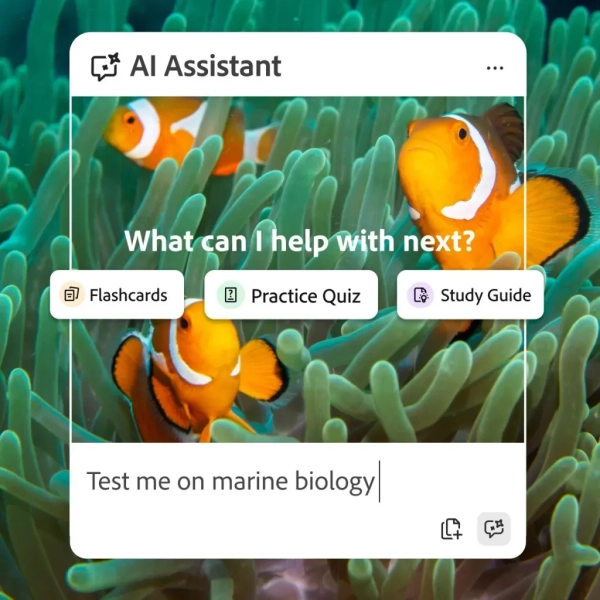
One of the key features of Acrobat Spaces is its built-in AI assistant. It functions as a 24/7 tutor, able to explain complex concepts and provide clear answers to the user's questions.
Acrobat Spaces / Photo Adobe
An important point is that artificial intelligence bases its knowledge exclusively on downloaded documents, without searching for anything on the Internet or its own databases, which significantly minimizes the risk of errors or inaccuracies.
All answers are accompanied by interactive quotes with links to the original source, allowing students to instantly verify the veracity of the information.
For those who prefer audio, the platform offers an innovative feature that turns notes into short audio summaries or in-depth podcasts with two virtual hosts, allowing you to absorb the material while commuting to university or working out at the gym.
This approach supports different learning styles – from visual to auditory, ensuring maximum flexibility in the educational process.
Adobe's Acrobat Spaces presentation: watch the video
Work together
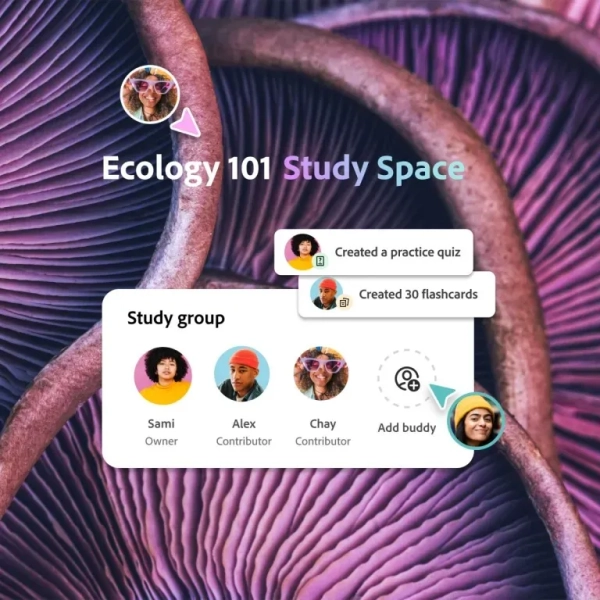
The platform also places a strong emphasis on teamwork, 9to5mac reports. Students can invite classmates to shared digital spaces to share notes, discuss projects, and co-create presentations in real time.
For individual lessons, there is a special focus mode that helps you avoid distractions and concentrate on studying the material.
Acrobat Spaces / Photo Adobe
You've seen this somewhere before.
If all of these features sound familiar, it's because the new service is copying Google's NotebookLM approach. We previously covered it in detail, calling it “the best service of our time.” If Adobe isn't going to offer anything new that would differentiate its product from its competitors, it's unclear how it plans to promote the new product.
Perhaps the service will have a special emphasis on the quality of the generated photo materials, since the company mainly specializes in this, having the Firefly image generator in its arsenal.
How to use the new product
The product development was accompanied by thorough testing with the participation of about 500 students and active collaboration with university groups from Harvard, Berkeley, Brown, Marshall and San Jose universities, as well as the University of Minnesota.
Charlie Miller, Adobe's vice president of education, emphasized that the company aims to eliminate the need for users to constantly move documents between different services by offering everything they need in one window.
To make the tool as accessible as possible, Adobe has placed it on a separate resource, where you can start working even without prior registration in the system.
Unfortunately, the new service is not yet available to everyone. You can visit the Acrobat Student Spaces page to see if you have access, but the company says for most of its customers that “the feature is currently in closed beta.” There is no word yet on when it will be available to the general public. It is also not known whether the service will be available to all countries at once.