
Comfortable reading without extra costs – an easy way to upgrade your old device / Depositphotos
Many of us have old smartphones gathering dust in our drawers that can no longer cope with modern loads, but are still quite functional. Instead of trying to turn them into mediocre surveillance cameras or DVRs, there is a much more practical solution that allows you to get a device for peaceful leisure.
How can an old smartphone replace an e-book?
There are many creative ways to give an old phone a new purpose. It can be used as a smart home sensor, a digital desk clock, or even as a car navigation system. However, the problem is that an old smartphone often loses out to specialized devices in terms of performing these tasks, writes 24 Kanal .
The most successful and logical solution is to transform your gadget into a reading device, free from any digital stimuli. This not only saves you about $200 on the purchase of a professional reader, but also provides a surprisingly comfortable experience. The main thing is to properly configure everything for the comfort of your eyes.
Remove distractions
The first step to transformation is working with the interface. Modern phones are full of bright icons, notifications and news feeds that constantly distract from text. To change this, experts advise installing a minimalist launcher, for example, Before Launcher. It replaces the chaotic accumulation of icons with a simple text list of only the most necessary applications.
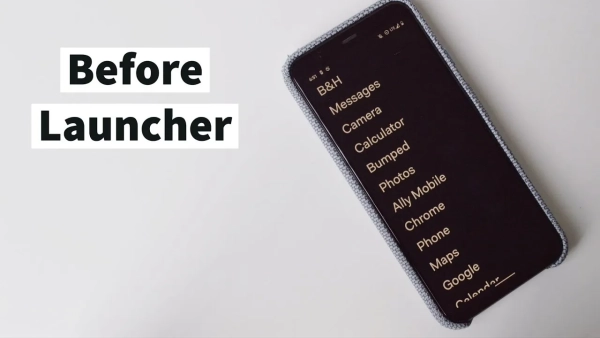
Before Launcher / Photo by Jose Briones
In addition to aesthetic peace, this approach significantly speeds up the system on older processors. Additionally, it is worth removing all unnecessary games, applications and social networks, which will free up memory resources and minimize the desire to scroll through something.
Choose the right mode
To make the reading process as immersive as possible, it is recommended to activate the “Do Not Disturb” mode on a permanent basis or on a specific schedule. The best solution would be to not install a SIM card in such a smartphone at all and turn off the Internet. This will additionally save you battery for longer reading.
Adjust the screen
Screen settings are an important aspect, as smartphone displays are significantly different from e-ink panels. LCDs are usually too bright and glossy, which is tiring on the eyes.
To get a closer experience to the paper format, you should use a blue light filter. Different manufacturers may call this feature “Reading Mode,” “Night Mode,” or “Eye Comfort,” but the result is always the same – the image becomes warmer (yellower), which reduces the strain on your eyes in the dark.
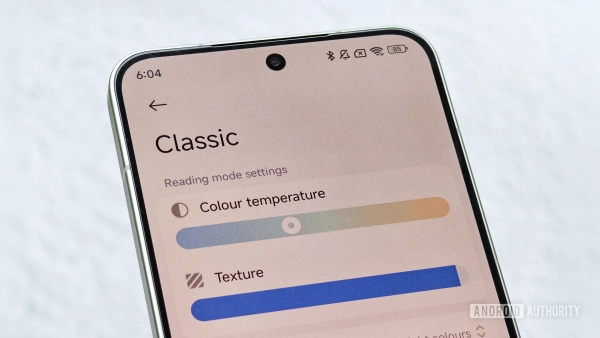
Night mode is more comfortable for the eyes / Android Authority
If that doesn't work, you can enable Grayscale mode in your accessibility settings. The monochrome image looks calmer and makes the device less appealing for wasting time on the Internet.
Choose the right software
When it comes to software, the choice depends on your habits.
- The Amazon Kindle app will be an ideal choice for those who already have their own library on this service and want to synchronize their notes and reading progress.
- There are also alternatives such as Libby, Apple Books, or Google Play Books.
- The ReadEra app deserves special attention. It does not require creating accounts, is free of ads, and supports almost all existing e-book formats, while maintaining a simple and functional interface.
- Finally, recently, Ukrainian publishers and stores have started releasing their own reading apps. Many books are now impossible to download in electronic format at all, and the only way to read them is through a mobile app on a smartphone.
The final touch
To complete the look of a professional reader, it's worth taking care of physical accessories. The best way to get rid of glare on the screen is to stick a matte protective film. It will give the display a pleasant texture to the touch and make it look like real paper.
Since a smartphone is much smaller than a standard e-book, holding it in your hands for hours may not be very comfortable. In this case, special holders, rings or straps that attach to the back panel can help.
If you prefer reading at a table, the stand will make the process of using your old gadget much more comfortable and ergonomic.