
Main points
- Google Translate for Android is preparing an offline simultaneous speech translation feature that will allow you to translate conversations without the Internet by downloading language packs in advance.
- Google is also working on other updates, such as Gemini AI integration, Android 17 security improvements, and new features for cars with Android Auto.
Google Live Translate will work without the Internet / Depositphotos
Google is approaching another major milestone in the development of machine translation. The Translate app for Android has seen signs of a feature that could change the way we communicate while traveling and working offline.
According to Android Authority, in version 10.17.48.914427315.6 of the Google Translate app for Android, signs of preparation for the launch of offline simultaneous speech translation have been found.
How exactly will this work?
We are talking about the Live Translate function – a mode of translating live conversations in real time. This format has been associated with science fiction for many years – from the “universal translator” in Star Trek to the Babel fish from The Guide to the Galaxy.
Modern technologies have already come close to this concept, and the development of artificial intelligence models, in particular Gemini, has significantly improved the quality and speed of translation.

However, in its current form, Live Translate has an important limitation – the feature does not work without an internet connection. If the user tries to run voice translation offline, the application will notify that a network connection is required.
The situation may change in one of the upcoming updates. Android Authority managed to activate hidden interface elements that demonstrate preparation for offline Live Translate mode. And we are not talking about just individual lines of code – the journalists saw an almost finished onboarding screen that introduces the user to the new feature.
This was also confirmed by Phandroid. Judging by the available information, for the function to work, language packs will need to be downloaded to the smartphone in advance. A similar mechanism is already used for offline translation of text and images in Google Translate.
The new interface also shows that the app will be able to separately mark languages with offline Live Translate support.
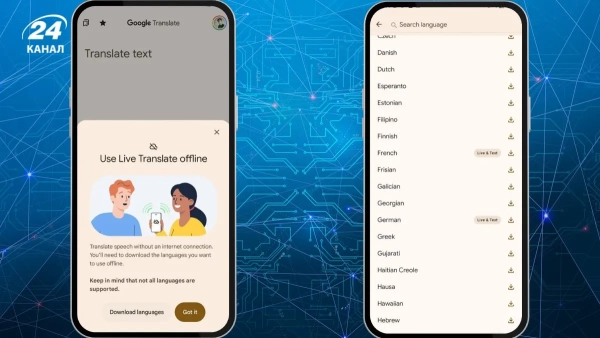
Live Translate will translate offline if you download a language pack first / Photo Android Authority
At launch, support will likely include:
- English,
- French,
- German,
- Spanish,
- Italian,
- Portuguese language.
These are the main Romance-Germanic languages that Google traditionally adds to new features first.
Why is this an important feature?
For travelers and users in areas with poor connectivity, this feature can be very important. Offline translation of live conversations will allow you to communicate without dependence on roaming, Wi-Fi or mobile Internet.
Google is also testing minor changes to the Translate interface for Android. The company is moving the text insertion, handwriting, and voice recording buttons to a single bottom bar for faster access.
However, the feature is still in development. Android Authority notes that the information was obtained through an APK teardown – an analysis of the application code. Such findings often provide advance information about future features of services, but Google may change the feature or refuse to launch it publicly altogether.
What other new features is Google preparing for Android?
In addition to offline voice translation in Google Translate, Google is preparing a number of other major updates for Android, many of which are related to Gemini artificial intelligence and new Android 17 features. The company has already partially shown many of them during the Android Show 2026 and on the eve of the Google I/O conference.
One of the main directions will be to transform Gemini into a full-fledged “AI agent” . According to Android Central, Google is working on a system that can interact with multiple applications at once and perform complex actions on behalf of the user. For example, AI will be able to independently arrange the delivery of products from the shopping list, book a workout or create a widget for the specific needs of the smartphone owner.
Another notable new feature is Contextual Suggestions . This is a system of personalized suggestions that will analyze user behavior and suggest actions depending on the situation. Android will be able to automatically recommend turning on a sports broadcast on TV, suggest the right playlist at the gym, or remind you about regular events.
At the same time, Google emphasizes that some data processing will be performed directly on the device.
The company is also working on new security features, including improved detection of fraudulent calls, verification of banking apps during suspicious calls, additional protection for lost smartphones through biometrics, and enhanced scanning of APK files for malware.
Android 17 may also get a number of smaller but useful features. Tech Republic mentions built-in blocking of individual applications without having to hide them in Private Space, a new double-tap gesture to turn off the screen, and Motion Assist, a mode to reduce motion sickness symptoms when using a smartphone in transport.
Google is also continuing to update Android's design. With the launch of Material 3 Expressive, the system will receive even more blur effects, new animated 3D emojis, and expanded interface personalization capabilities, writes Wired.
A separate focus of the company is cars and Android Auto. According to Car and Drive, Google is already testing a full-screen mode for non-standard displays in modern cars, support for in-cabin video services, and deeper integration of Gemini with car systems. The AI will be able to answer questions about the car's status, route, or help with navigation.