
Main points
- An engineer has created a miniature laptop in a lollipop tin using a Raspberry Pi Zero and an LCD screen.
- He designed his own keyboard and got the system up and running, using 3D printing for the internal frame and solving the overheating problem.
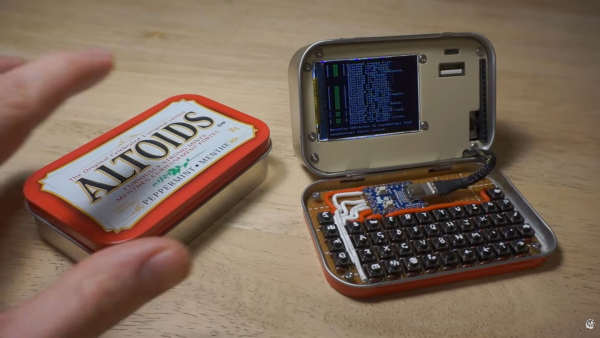
A laptop that fits in the palm of your hand / Screenshot from Channel 24
Most people just throw away the metal candy boxes after they're empty. However, for a talented engineer, the ordinary packaging became the basis for creating a unique technical device that combines cyberpunk style with the functionality of a full-fledged PC.
How did you manage to fit the entire system into the limited space of a can?
Altoids mint candies have long been a cult item among DIY enthusiasts. They are usually transformed into first aid kits, survival kits, or portable game consoles. However, the author of the Exercising Ingenuity YouTube channel decided to go much further. As Popular Science notes, he created a full-fledged “cyberdeck” – a compact and secure computer inspired by classic science fiction.
Have you ever looked at an Altoids tin and thought, “That looks like a tiny computer”?
– the author asks in his video, and then shows how he turns it into a miniature laptop.
The term “cyberdeck” originates from William Gibson's cult novel “Neuromancer”, published in 1984. Typically, such devices are created with an emphasis on durability and utility, using ammo boxes or protective Pelican cases for the body. However, the main challenge of this project was precisely the extreme miniaturization.
The heart of the system was the Raspberry Pi Zero single-board computer, which had to be supplemented with an LCD screen with a diagonal of about 5 centimeters.
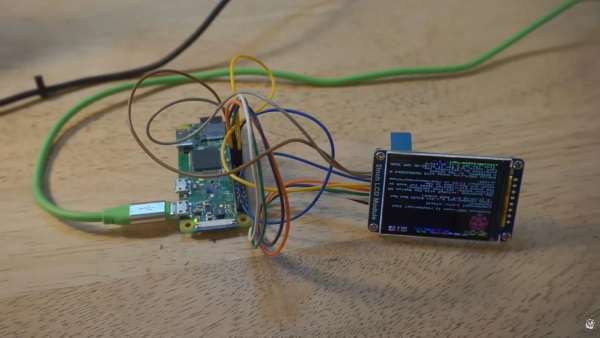
Future computer screen / Screenshot of Channel 24/Exercising Ingenuity
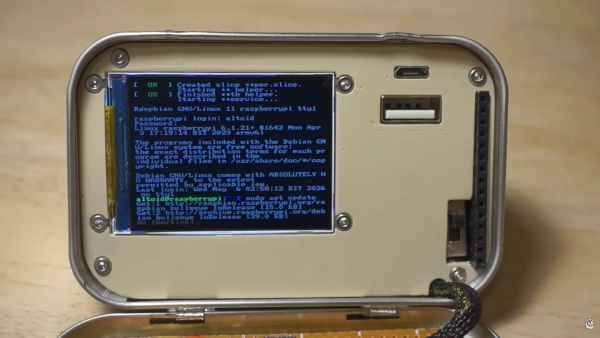
Ready-made screen / Screenshot of Channel 24/Exercising Ingenuity
The process of configuring the display proved to be a difficult task, as it operates over the SPI interface. This forced the developer to use an outdated version of the Raspberry Pi OS and make a lot of changes to the configuration files.
To ensure autonomy, he used an uninterruptible power supply board (UPS hat), although the author had to fix the flaws in the factory soldering himself to make everything work properly.
The most difficult part of this project was designing the keyboard, as it had to be small enough to fit inside such a small tin. The author decided not to look for anything on the market, but instead to design everything himself, studying the principle of the diode matrix – a system where buttons are connected in rows and columns with diodes for each key. This allows you to connect a large number of buttons to a limited number of microcontroller inputs.
The author chose the RP2040 as the microcontroller, and the software was based on KMK firmware running in the Python programming language. Despite the painstaking work with the soldering iron, the author claims that this was “a really enjoyable part of the project.”
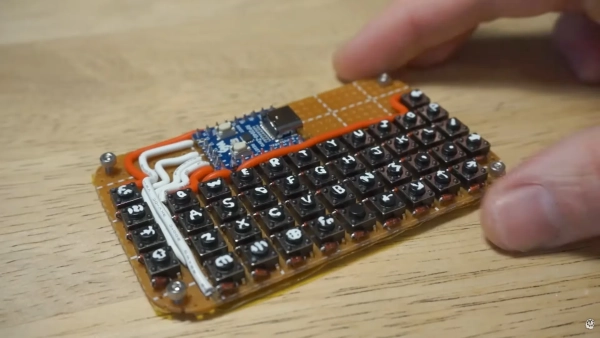
Keyboard with hand-drawn key markings / Screenshot from Channel 24/Exercising Ingenuity
Putting all the components together was like playing Tetris. To securely secure the parts inside the case, the btuber printed a flexible frame on a 3D printer, which was fixed by the front panel.
To prevent overheating, he added a thermal pad that conducts heat away from the processor to the metal wall of the can. During the work, he literally had to “cut off the excess”: the author unsoldered the connector from the display and connected the wires directly to the board to gain precious millimeters.
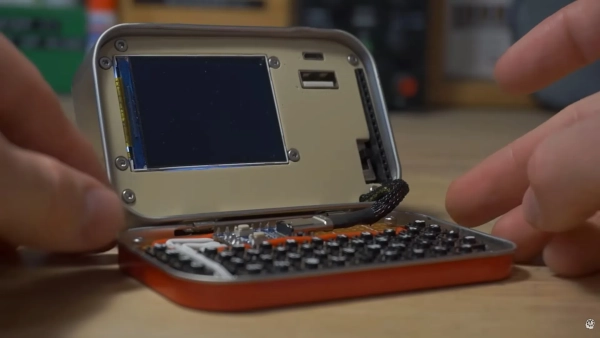
Pocket computer in a tin box / Screenshot of Channel 24/Exercising Ingenuity
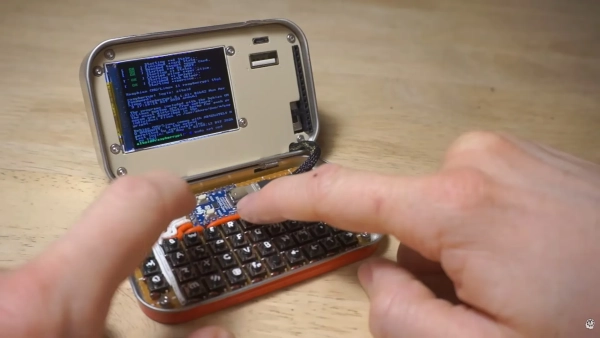
Pocket computer in a tin box / Screenshot of Channel 24/Exercising Ingenuity
Later, it turned out that even after all the manipulations and efforts, the can did not close all the way. The solution was to use parts from another identical box, with which it was possible to lengthen the hinges.
In the final stage, the author painted the front panel a beige color reminiscent of vintage computers and engraved the markings for the 15-pin GPIO connector, charging ports, and USB.
The result is a device that not only looks aesthetically pleasing, but is also capable of performing practical tasks, such as controlling the operation of a servo drive.
The full video on YouTube shows the entire process: watch the video
You may also be interested in knowing: what is Raspberry Pi Zero
Raspberry Pi Zero is an extremely compact single-board computer created by the British organization Raspberry Pi Foundation. Its main idea is to give users a cheap, small and energy-efficient platform for programming, electronics and DIY projects. In fact, it is a full-fledged minicomputer about the size of a chewing gum, writes 24 Kanal .
The basic Raspberry Pi Zero model has a single-core Broadcom BCM2835 processor with a frequency of 1 GHz, 512 MB of RAM, a mini HDMI port, a micro USB port and a 40-pin GPIO interface for connecting electronics. There are also versions of the Raspberry Pi Zero W and Zero 2 W with support for Wi-Fi and Bluetooth, according to the Raspberry Pi page.
Despite its lower performance compared to regular desktop PCs, the Raspberry Pi Zero is capable of performing many real-world tasks. It is used to run Linux, write code, control robots, create smart home systems, media centers, retro consoles, automation servers, and even portable computers. Due to its low power consumption and small size, it is often built into drones, sensors, robotics, or compact gadgets.
The Raspberry Pi Zero has gained particular popularity among enthusiasts due to its GPIO pins. They allow you to directly connect LEDs, sensors, screens, motors, and other components. Because of this, the board is actively used in teaching programming and electronics. Many people begin their acquaintance with Linux or Python precisely through the Raspberry Pi.
What is Raspberry Pi OS?
The Raspberry Pi has an official operating system, Raspberry Pi OS, formerly known as Raspbian. It is based on Debian Linux and is specifically optimized for the weak hardware of Raspberry Pi single-board computers.
Raspberry Pi OS comes with a graphical interface, the Chromium browser, office applications, programming tools, and educational software. Python, Scratch, and other learning environments are integrated into the system. Its main advantage is its stability and very low resource requirements. Even old Raspberry Pis can run this OS normally.
Both the “full” versions of Raspberry Pi OS with a desktop and the Lite editions without a graphical interface are popular among enthusiasts. The latter are used for servers, network projects or automation. The system can be installed via the official Raspberry Pi Imager tool.
A second life for Altoids: why the candy box became iconic
Altoids tins have long been a cult favorite among DIY enthusiasts. Their popularity is simple: they're cheap, durable, compact, easy to drill, and the perfect size for small electronics projects. DIY culture has even developed a distinct aesthetic style called “Altoids tin projects.”
One example is MintyPi. This is a miniature portable retro console based on the Raspberry Pi Zero and RetroPie, hidden inside an Altoids box. Inside was a small display, battery, control buttons and the computer itself. This device ran old games from Game Boy, SNES and other retro platforms. The project was so popular with the community that dozens of its modifications appeared.
MintyPi project: watch the video
Another interesting example is an iPhone charger. The author put together a simple circuit based on a 9V battery and a voltage regulator, added an LED indicator and a few resistors to “trick” Apple devices into charging. This works not only with iPhones, but also with other gadgets that charge via USB.
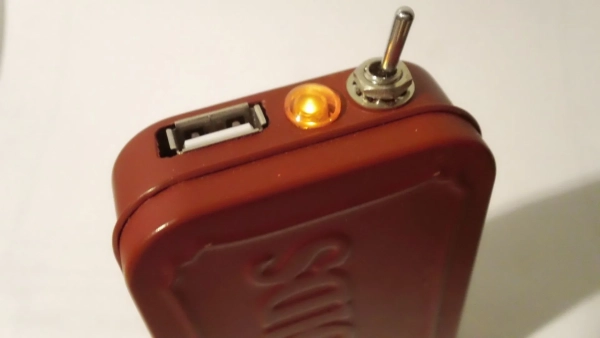
iPhone charger in an Altoids box / Photo by Matt E. Jenkins
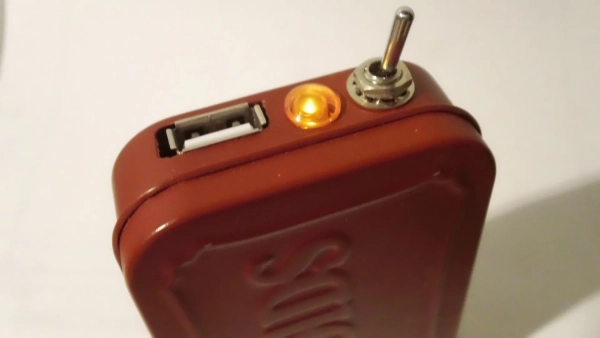
iPhone charger in an Altoids box / Photo by Matt E. Jenkins
In addition, people are building mini cameras, radios, network hacking kits, GPS trackers, pocket servers, and even solar panels in Altoids boxes. This has become somewhat of a subculture among DIY and retro-tech enthusiasts.