
Main points
- Cybersecurity experts have discovered 28 malicious apps on Google Play that provided falsified information instead of real data and demanded payment for “services.”
- These apps, which were installed over 7.3 million times, have been removed from the store, but users who used third-party payment methods will have to contact their banks for a refund.
Fraudulent apps have defrauded millions of Android users / Unsplash
The Google Play Store is back in the spotlight after a massive malware network was discovered. Cybersecurity experts have identified dozens of apps that promised the impossible, trapping over seven million people worldwide into giving up money for nothing.
How did the scheme work and why did millions of people believe it?
Security researchers from ESET discovered 28 malicious apps in the official Google Play store, collectively called CallPhantom. These apps promised users access to other people's confidential information: call history, SMS records, and even WhatsApp call logs for any phone number. Despite the fact that such functions are technically impossible, the audience's curiosity led to the fact that these apps were installed more than 7.3 million times, writes PhoneArena.
Analysis showed that all the information provided by the programs was completely fake. Instead of real data, users received randomly generated phone numbers, which were combined with names, times, and durations of calls hard-coded in the program code.
As noted in the report, scammers even used screenshots with fake codes in the app description itself on the Play Store to convince victims of the service's functionality.
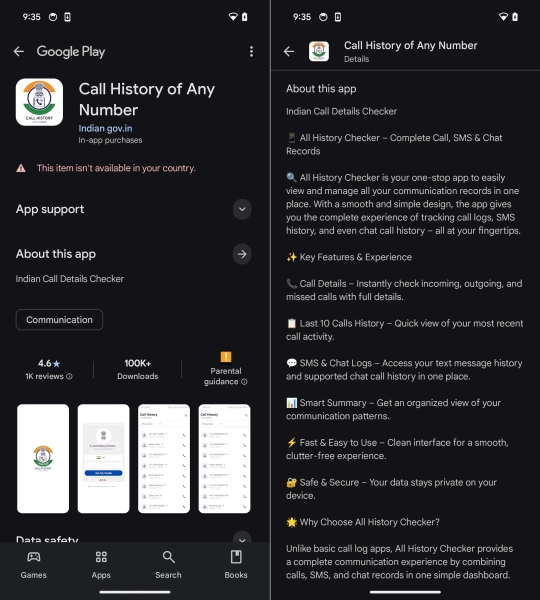
One of the fraudulent apps that targeted India / ESET screenshots
The fraudulent campaign was clearly structured. Experts identified two main clusters of applications:
- The programs of the first group showed the user partial “results” with fictitious data and demanded payment to view the full list.
- The applications in the second cluster asked to enter an email address to which the collected call history was supposedly to be sent, but no data generation began until the subscription was completed.
Interestingly, the developers tried to look as legitimate as possible. One of the most popular apps was called “Call History of Any Number” and was published on behalf of the developer Indian gov.in, i.e. supposedly from a government agency. This created a false impression of a connection with the Indian authorities, although in fact the program had no connection to them.
The main market for the attackers (but not the only one) was India, the second largest smartphone market in the world. The apps often had the country code +91 pre-selected and supported the local UPI payment system.
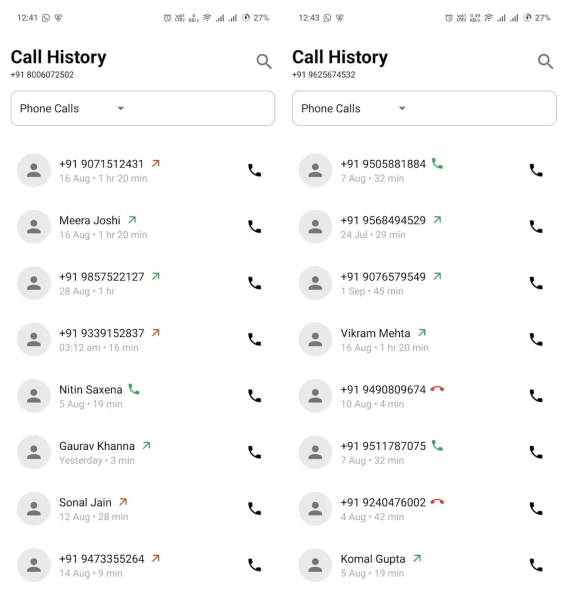
Generated numbers allegedly detected by the program / ESET screenshots
How much did it cost the victims?
Prices for CallPhantom's “services” ranged widely: from 5 euros for the cheapest subscription to 80 US dollars for premium packages.
Psychological pressure methods were used to force the user to pay. For example, if a person exited the program without paying, they could receive a fake notification disguised as an email stating that search results had already arrived. Clicking on such a notification would take them directly to a payment page.
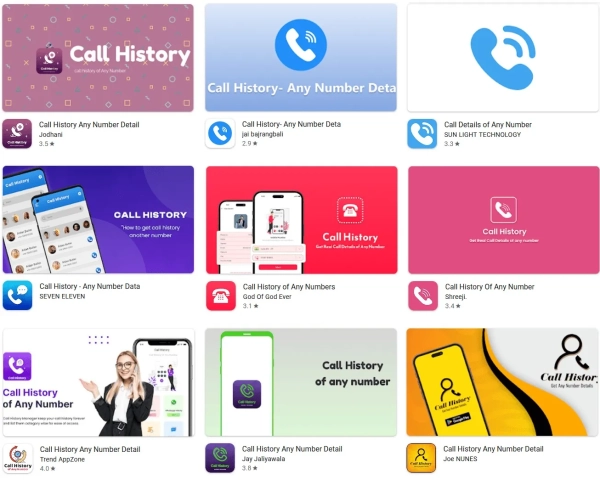
CallPhantom Programs / ESET Screenshots
Lukas Stefanko, a malware researcher at ESET, emphasized that these apps did not request dangerous permissions because they did not contain any functionality to actually collect data from the device. The scammers were simply exploiting people's curiosity.
Since ESET is a partner of the App Defense Alliance, all detected apps were reported to Google and subsequently removed from the store.
The programs were deleted, but…
However, removing the apps did not solve all of the users' problems. Those who subscribed through the official Google Play payment system can expect a refund according to the platform's policy.
However, some CallPhantom apps used third-party payment methods, such as UPI or direct card data entry within the app. In such cases, Google cannot cancel the transaction or refund the money, so victims will have to contact their banks or payment providers directly.
You will also be interested to know: how to avoid being caught by fraudulent apps – the main signs of fraud
Rogue apps have long ceased to be primitive “viruses” with strange names. Today, they often look like ordinary photo editing programs, smartphone cleaning programs, VPN services, call trackers, crypto wallets, or even banking applications. Some of these programs even end up in the Google Play store, which is why users mistakenly consider them safe just because they are in the official catalog.
One of the main signs of a fraudulent app is overly aggressive promises. If the program claims to be able to show someone else's WhatsApp messages, call history, “hack” an account, or instantly speed up a smartphone several times, it is almost guaranteed to be a scam aimed at those who want to spy on the device of their partner, friend, or enemy at any cost, writes TechRadar.
Another sign is a strange set of permissions. For example, a calculator or flashlight should not ask for access to contacts, microphone, SMS, or Android Accessibility Services. It is through Accessibility Services that malicious apps often gain control of the screen, read messages, press buttons for the user, and even steal banking information.
It is also worth paying attention to the developer's page. Fraudulent applications often do not have a proper website, privacy policy, history of other applications, or a clear description of the company. Developer names may look random or change. Sometimes scammers copy the design of well-known applications, but add subtle changes to the name.
A separate problem is fake reviews. Google Play has long had a whole market for cheating ratings and comments. There is an entire scientific study on this topic, which can be read on the arXiv preprint server. In it, the authors discovered schemes in which applications artificially received high ratings through bot networks and purchased accounts. Therefore, a large number of five-star ratings in itself does not guarantee safety. Short, template comments like “Excellent app”, “Very good” or hundreds of similar reviews in a short time should arouse suspicion.
Why can't Google Play completely stop dangerous apps?
Many users wonder why Google even allows dangerous apps into its store. In fact, the review process is very complex and partially automated. The developer creates an account, uploads the app’s APK file, description, screenshots, and undergoes an automated scan. Google uses machine learning, behavioral analysis, and manual reviews. The company claims to have blocked over 1.75 million dangerous or fraudulent apps and over 80,000 developer accounts in 2025.
The problem is that hackers are constantly adapting. Some malware behaves “normally” during scanning, but activates dangerous functions after installation or a few days later with an update that introduces new code.
The situation is complicated by the scale of the store itself. Google Play contains millions of applications, and new applications and updates appear constantly. Even automated AI systems cannot guarantee 100% threat detection. In addition, fraudsters actively use obfuscation – deliberate obfuscation of code, which makes it difficult to analyze the application.
How to check an Android smartphone after installing a suspicious application?
- If the user has already installed a suspicious application, the first thing to do is to check the application's permissions. In Android settings, open the “Permissions” section and see what the application has access to. Pay special attention to SMS, Accessibility Services, microphone, camera, contacts, and device administrator functions, advises 24 Channel .
- After that, it is worth checking the list of installed programs. Some Trojans disguise themselves as system services or even remove their icon. If the smartphone starts to discharge faster, overheat, show strange ads or open pages on its own – these are alarming signals.
- You also need to open Google Play Protect. This system is built into Android and regularly scans installed apps. It can automatically warn you about dangerous apps or even remove them. According to Google, Play Protect checks hundreds of billions of apps every day and in 2025 detected more than 27 million malicious apps outside of Google Play.
- After removing the suspicious application, it is worth changing passwords for banking services, email, and social networks, especially if the application had access to Accessibility Services or could see the contents of the screen. In the case of banking Trojans, this is enough to intercept verification codes and log in to accounts.
- In more complex cases, the most reliable solution is to completely reset the smartphone to factory settings. This is especially true if the application has received device administrator rights or has started blocking deletion. Before resetting, it is important to save photos and documents, but do not transfer APK files or backup copies of questionable applications back to the device.