
Main points
- To charge your smartphone via USB-C as efficiently as possible, it is important to use a quality charging unit and cable that support appropriate technologies, such as USB Power Delivery or Qualcomm Quick Charge.
- The conditions in which the device is charged also affect the speed, so you should avoid overheating by placing the gadget in a cool place without resource-intensive applications.
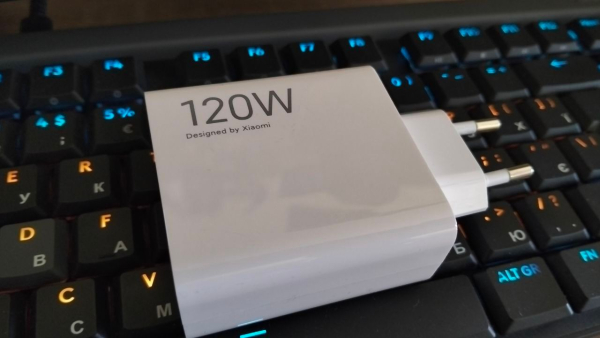
Why does the smartphone charge slowly via USB-C / 24 Channel?
Many people believe that the USB-C connector automatically guarantees super-fast charging of a smartphone. However, in practice, owners of phones and laptops often encounter low power transfer speeds. The reason lies not only in the hardware, but also in the wrong accessories or conditions of use.
Understanding how the adapter, cable, and external factors interact will help ensure your device delivers the power it promises, if it supports the appropriate technology. 24 Channel shares firsthand how the right accessories can help ensure fast charging speeds.
Why might a smartphone not charge fully?
The modern USB-C standard has made life much easier for users, eliminating the need to guess which way to plug the cable, which was a perennial problem with USB-A. However, having the right port doesn't mean that your device will receive power at maximum speed.
For the system to work effectively, perfect compatibility of three elements is necessary:
- the gadget itself,
- charging unit
- and cable.
This is best ensured by the manufacturer itself, so we recommend buying original accessories that match the specifications of the smartphone. This means that compatibility of charging technology, capabilities, and power supply for this technology are required.
In addition, the wire itself must also support a certain bandwidth to be able to provide current for fast charging of the device.
Why is it important to have a quality charging unit?
So the first and most common mistake is using an inappropriate adapter . If the power supply does not support high power (wattage), the smartphone will only charge at the speed that this “weak” accessory allows.
For example, the Samsung Galaxy S25 Ultra supports wired charging up to 45W, but only comes with a cable, so you have to buy an adapter separately . Meanwhile, the OnePlus 13 comes with a fast charger already included in some countries.
Interestingly, using a more powerful unit than your device needs is completely safe: the system will automatically limit power consumption to the maximum allowable level. However, cheap or outdated adapters simply will not allow you to realize the full speed potential .
Tip! If you are buying a new charger and your smartphone supports fast charging technology, make sure that both devices are compatible, as there are several technologies on the market, divided between manufacturers and brands, and not all of them can work together. At the same time, there are more expensive power banks that support different technologies. Such devices are great if you have several smartphones from different brands at home.
Won't any cable work?
Actually, no. The second critical factor is the quality and characteristics of the cable . Using a random “cord” found at home often causes slow operation even with a powerful power supply.
Older cables, even if they still look functional and charge your device without any problems, most likely do not support modern fast charging standards. They are easier to distinguish visually, as they are usually thinner and lighter.
So, you should choose cables that support USB Power Delivery (PD) or Qualcomm Quick Charge technologies, with the appropriate markings on the box. Physical construction also plays an important role: thicker wires with a lower gauge provide better current flow.
Length also matters, as cables that are too long (e.g. two meters) can degrade the signal, slowing down the process.
For devices up to 60W, a 3A cable is usually sufficient, but for laptops with a power of 100W, you will need a 5A option. And remember, a worn charging cable can cause device damage, fire, electric shock, and is dangerous to children and animals.
How to properly charge the device?
The third aspect that is often forgotten is the conditions the device is in while charging. High temperature is the biggest enemy of fast charging, so anything that provokes it should be avoided.
- This means that you should not charge the device in direct sunlight, such as on a windowsill or table where the sun shines.
- You should also not put your smartphone under a pillow, or sometimes even in a thick protective case that retains heat. The speed of the process will drop significantly due to overheating, and in the first option there is a far from zero risk of causing a fire.
- Forget about playing games and watching videos while charging. These processes put the smartphone under the most strain and heat it up at the same time, which negatively affects the health of the battery and significantly shortens the charging time, even if it is fast.
The best results are achieved in a cool place, with no resource-intensive applications running in the background.
How fast can a smartphone charge?
Modern smartphones equipped with fast charging technologies are able to restore most of the battery's working capacity in record time. With the right selection of accessories, you can achieve truly impressive results.
- For example, the iPhone 17 Pro Max with a 40W adapter restores 50% of its charge in just 20 minutes.
- The Google Pixel 10 Pro XL charges to 70% in half an hour with a 45-watt device.
- Even the upcoming foldable Samsung Galaxy TriFold will support 45-watt technology, allowing you to get half a charge in 30 minutes.
The main thing is to always check the technical specifications of your gadgets and accessories before purchasing so as not to waste money on devices that do not guarantee you a satisfactory result.
Before purchasing, it is better to ask a consultant (seller on the website) whether the accessory supports the standard you need, or whether it is compatible with your smartphone model.