
Main points
- To preserve battery life, it is worth limiting background app activity, AOD usage, and screen refresh rate.
- Disabling constant geolocation tracking, Touch to Wake gestures, and background Bluetooth scanning will help extend your smartphone's battery life.

Simple tips that will make your Android work much longer / Depositphotos
Modern Android smartphones are becoming more powerful, but we still often depend on chargers as a must-have accessory. Often, the cause of rapid discharge is not a worn-out battery or heavy games, but standard system settings.
Android has a number of hidden features that quietly drain your battery throughout the day, even when you're not using your device at all. 24 Channel shares its own experiences with the settings you can turn off to extend your battery life.
What hidden Android features steal your smartphone's battery every day?
One of the biggest “silent killers” of battery life is unrestricted background app activity . By default, the system allows many apps to run in the background so that they can synchronize data and update content in a timely manner.
Individual apps, like social media or games, may use little power, but together they add up to a huge load. Most apps, like food delivery services, don't need to run 24/7. You should set these apps to “Limited” in your battery settings to stop wasting power.
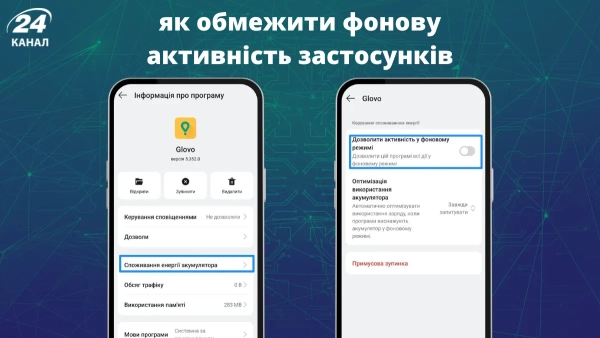
In the application settings, limit its background operation / Photo 24 Channel
Another aspect is the pursuit of image quality . Always-on display (AOD) and ultra-high refresh rates (120Hz or 144Hz) look impressive, but they come at a price. AOD means that part of the screen never turns off completely, and constantly working at the maximum refresh rate forces you to sacrifice battery life for smoothness, which is not always necessary.
Limiting AOD usage and switching to a lower refresh rate allows you to get extra screen time without losing overall smartphone functionality. You can always return to the high rate only for gaming or watching videos.
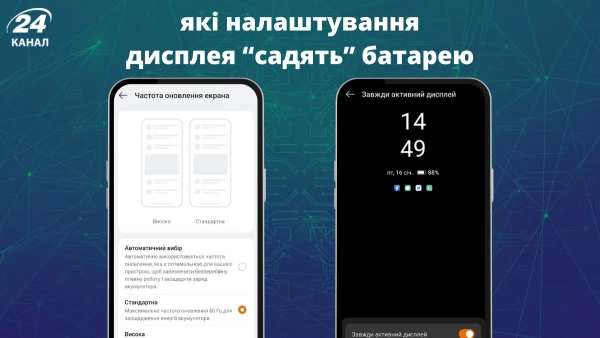
It's better to sacrifice high refresh rate and AOD / Photo by Channel 24
Equally dangerous for the battery is constant geolocation tracking . Many applications require access to your location even when it is not critical for their operation.
When an app is given permission to use precise location “always,” it actively uses GPS, Wi-Fi, and Bluetooth, which drains battery. It's a good idea to leave this access only for navigators or taxi services, and disable it for social networks and games.
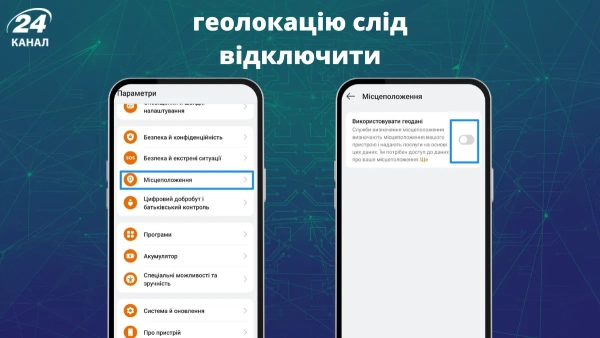
You don't need geolocation all the time, so turn it off when you're not using it / Photo by Channel 24
Interestingly, even convenient gestures like Touch to Wake consume power. For the screen to respond to your fingers, sensors and digital converters must constantly run in the background, waiting for input.
This is especially noticeable on older devices or when the phone accidentally “wakes up” in your pocket. Sometimes simply pressing the power button is much more beneficial for preserving battery life.
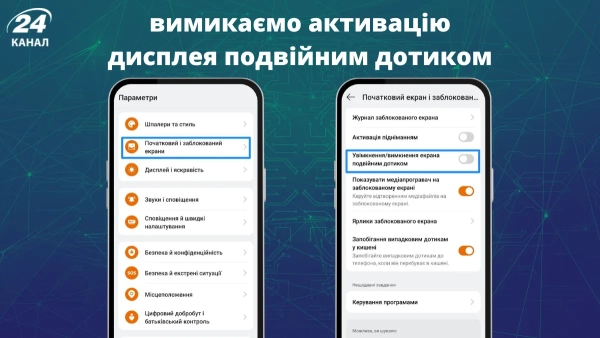
Double-tap activation also drains the battery / Photo by Channel 24
It's also worth paying attention to background scanning for Bluetooth and nearby devices . Even if you've turned off Bluetooth in the settings shade, the system may continue to search for other gadgets for quick pairing, which prevents the smartphone from going into deep sleep mode.
Limiting access to scanning nearby devices to only truly important apps will help avoid sudden battery spikes throughout the day.
Finally, advanced users can take advantage of the background process limit in Developer Options. This allows you to manually set the number of apps that can be kept in RAM at once.
For example, choosing the “no more than four processes” standard will help save RAM and power, although overly aggressive limits may affect notification reception.
Consciously managing these settings will allow you to achieve a tangible improvement in autonomy, which is much more important than any visual effects, especially in these difficult times.